A software factory for coding agents
The assembly line for AI software delivery.
Point Factorial at any repository, new or old. Agents build on your line, humans sign at the gates, and leadership sees the cost, agent runtime and tokens per project.
Your lines, your rules
Build the factory lines that suit your team.
A repository can carry any number of lines, and each ticket runs on exactly one. An epic doesn't need a build step. A bug doesn't need a spec. A dependency bump needs neither. Define a line per kind of work, then tag the issue with the one you want, or leave it untagged to run the project's default line.
A line for each kind of work
An epic runs a line that writes no code: an agent refines it, splits it into tickets, and a product owner signs off. A bug starts by reproducing. A dependency update bumps, tests and ships. Add a security review, a design gate, or a release step wherever your process needs one.
Tag it, or take the default
Put a factorial:process:<name> label on the issue and it takes that line. Leave it off, and the ticket runs the line the project names as its default. Two process labels, or a label for a line the repository does not offer, admit nothing. Either way, the ticket runs on exactly one line, and the record says which.
Change a line without stopping the factory
Add a stop, swap the agent on a step, or tighten a gate by editing the YAML. The change applies from the next ticket on. Tickets already running keep the version they started with, so nothing in flight breaks.
Agents on laptops don't scale
Coding agents work. The process around them doesn't exist yet.
Most teams have seen a coding agent finish a real task. Fewer have turned that into something they can run every day, for every ticket, with the same confidence they have in CI. The gap is not the model. It is everything around it.
Every developer runs agents differently
One person uses Claude Code, another Codex, each with their own prompts, on their own laptop, with their own credentials. Nothing is repeatable, and nothing is comparable.
Agents run with the keys to the kingdom
Agents run as the developer, with the developer's tokens, next to the developer's other work. A mistake or a prompt injection has the same reach as the person.
Nobody can say what the agent did, or why it merged
Chat history is not an audit trail. When a change ships, you need who asked for it, what the agent produced, who approved it, and what evidence backed the approval.
The bill arrives per organization, not per project
Token spend shows up as one line on an invoice. Leadership cannot say what a project cost this month, what a ticket cost, or whether a prompt change made things cheaper.
Agents grade their own homework
An agent that says "done" is not evidence. Without independent checks, the team either trusts the self-report or re-does the verification by hand.
Senior engineers become agent babysitters
The people you hired for design and judgement spend their day re-running prompts, copying branches, and shepherding pull requests. They should be making decisions instead of babysitting agents.
Works with what you already have
Nothing to migrate. Factorial sits on top of your existing tools.
Issues stay issues. Pull requests stay pull requests. CI stays CI. Your agents are the same Claude Code and Codex your developers use today. Factorial sits on top of your issue tracker, your source repository and your CI/CD, and adds the process, the gates and the record.
GitHub stays GitHub
Factorial installs as a GitHub App with a narrow permission set. It reads and writes issues, pull requests and branches, and is never granted permission to change your CI workflows.
Your agents, your vendor accounts
Runtimes wrap the Claude Code and Codex command-line tools your developers already have. The vendor key is yours, stored encrypted, and one process can mix both.
Existing repositories welcome
Onboarding is a folder, not a rewrite. A legacy monolith with its own CI and branch rules joins the same way a fresh repository does, in one pull request.
One ticket on the line
How it works
Onboard. Deliver. Understand.
Factorial is an orchestrator that runs an observe, evaluate, act loop for every active ticket. GitHub stays the system your team already uses. Factorial adds the process, the gates, and the record.
01 · ONBOARD
Make any repository ready for agents
Onboarding is a pull request to your own repo, not a migration. A .factorial/ folder holds the line, the agent manifests, and the prompts, all versioned with the code. Existing projects keep their CI, their branch protection and their history.
your-repo/
├─ .github/workflows/ci.yml     unchanged
├─ src/                         unchanged
├─ tests/                       unchanged
└─ .factorial/                  ← one pull request adds this
   ├─ processes/process-fix.yaml   the line: steps, gates, retries
   ├─ agents/build-agent/          manifest + prompt per agent
   └─ mcp/                         tools the agents may ask for
- Install the Factorial GitHub App with a deliberately narrow permission set. It can never write workflows.
- Start from a reference line (plan, spec review, build, test, code review) or write your own in YAML.
- Choose the runtime for each step: Claude Code, Codex, or both across the fleet. Model ids, turn limits, and time limits are explicit.
- Declare which MCP tools agents may use. The repo selects, the operator permits, so a change in the repo cannot grant itself new reach.
- Pin the config. Every ticket snapshots the process it was admitted under, so editing config never disturbs work in flight.
02 · DELIVER
Ship features through a repeatable line
A ticket enters with a label. From then on the orchestrator drives: it spawns the agent for the current step, watches GitHub for the result, checks the postconditions, and promotes or retries.
- Agents work in isolated environments with a one-hour, repo-scoped token minted for that run alone.
- Each agent step ends in a pull request on its own branch. Agents never merge, never approve, and never push to main.
- Human gates park the ticket, assign the reviewers, and wait. Approve, request changes, or send it back a step.
- Stop a run from the dashboard, leave a comment, and resume. The agent continues its own session with your comment as its next instruction.
- Retries, timeouts, and escalation are policy in the process file, not tribal knowledge.
03 · UNDERSTAND & OPTIMIZE
From the executive view down to one step
Every action is an event in an append-only log. The dashboard, the audit trail, and the cost reports are all views over that one record, so they never disagree. Leadership sees each project's total cost, agent runtime and token consumption. Engineers drill down to the ticket and the step.
- Project-level totals: cost, agent runtime, tokens and retries, on one board.
- One square per ticket, one band per project, one column per state. Colour it by cost, runtime, tokens or retries.
- Every ticket carries cost, tokens, retries and wall time for each step, attributed to the issue.
- Compare runtimes and models on real work. Move a step from one agent to another and measure the difference.
- Find where tickets wait. The board shows which tickets sit at a gate.
- Export the event log. It is yours, it is complete, and nothing in it is ever rewritten.
| Step | Runtime | Tokens | Cost | Retries |
|---|---|---|---|---|
| plan | Claude Code | 61,300 | $0.74 | 0 |
| build | Claude Code | 348,900 | $4.12 | 1 |
| test | Codex | 129,400 | $1.36 | 0 |
| Ticket total | 539,600 | $6.22 | 1 |
Example figures. Issue to merge: 1h 48m, of which 1h 10m waiting at human gates.
In the dashboard
One ticket, every step, every dollar.
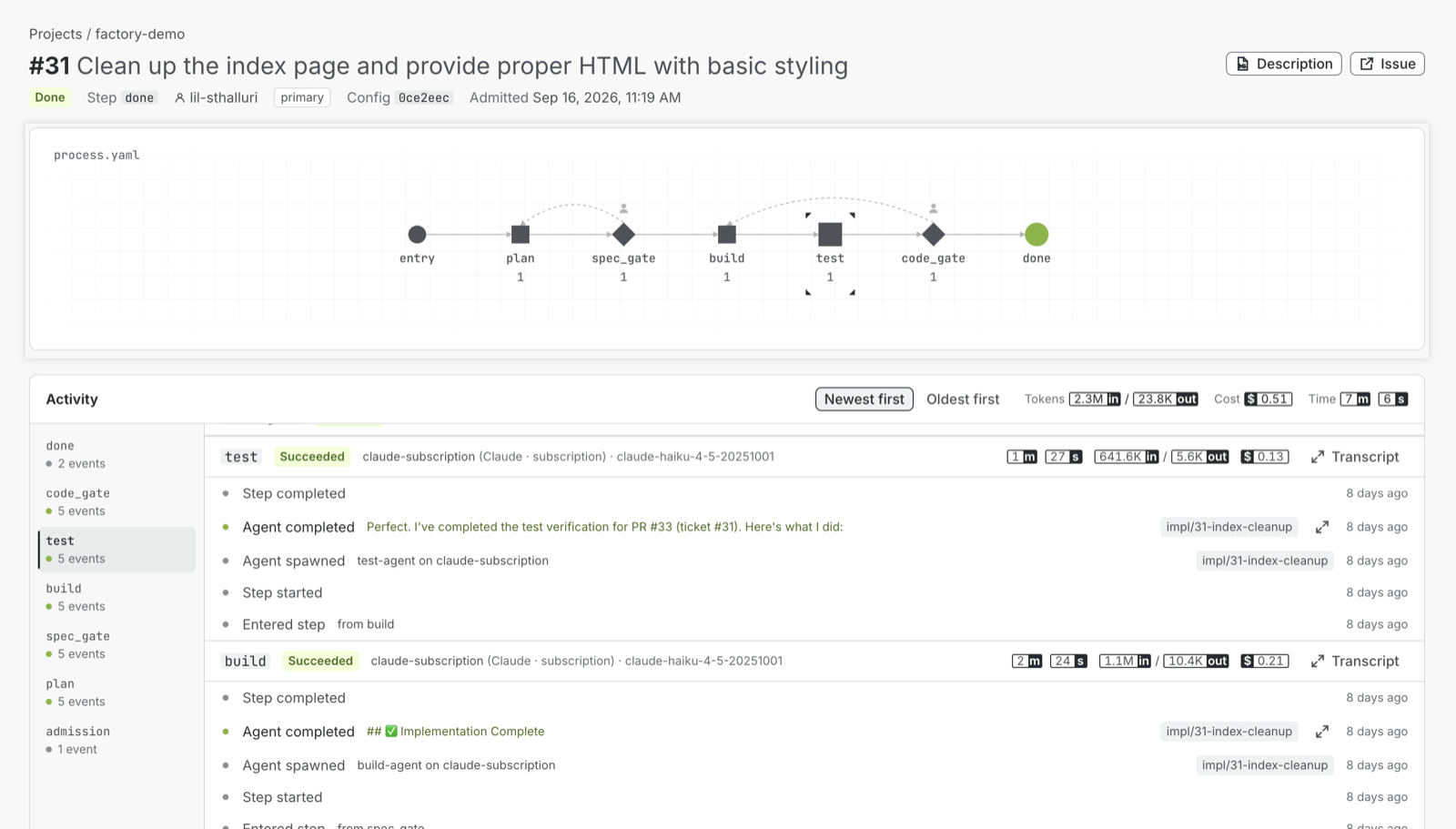
This is a real ticket on the factory-demo project. The line it ran on is drawn at the top, the activity log below records every event, and each step reports its own tokens, cost and time. The header rolls them up for the ticket.
Features
Built for the part of the job the agent can't do.
Factorial does not replace your coding agent. It gives the agent a place to work, a process to follow, a reviewer to answer to, and a record to leave behind.
Isolated workspaces
An isolated workspace for every run
Each agent run gets a fresh workspace of its own, a sandboxed virtual machine or a dedicated git worktree, and never an operator's working copy. Every run gets a token that expires in an hour and reaches one repo. Nothing the agent writes is executed or interpolated by the orchestrator; it is data to be compared and checked.
Standardized delivery
The same line for every feature
A process is a graph of steps in YAML. Every ticket follows it the same way, with the same gates, the same checks, and the same output shape. Rework is a step, not a chat thread.
Auditability
Every execution, fully visible
Who opened the ticket, which process version it ran under, what each agent produced, what evidence advanced it, who approved. All in an append-only event log with no updates and no deletes.
Cost at every level
From the project total to one step
Executives see total cost, agent runtime and tokens per project. Engineers see the same figures per ticket and per step run, per runtime and per model. One record, every altitude.
Adapts to your SDLC
Your line, your gates
Add a security review step. Require two approvers on the spec. Route the test step to a different agent. Keep a human at merge. Each repository can carry more than one line, and an issue names the one it enters.
Works on your stack
GitHub, Claude Code and Codex, as they are
No new issue tracker, no new CI, no new agent. Runtimes sit behind one contract, so you use the vendors you already pay for, mix them across steps, and compare them on the same tickets.
Evidence, not self-reports
Postconditions gate every step
A step advances only when the orchestrator can verify it: pr_open, ci_green, pr_approved, and a closed library of checks like them. An agent saying "done" moves nothing.
Security model
Containment is structural, never a line in a prompt.
Anything that relies on an agent behaving is not a control. Factorial is designed so that the important boundaries hold even if an agent is confused, compromised, or simply wrong.
A human approves every merge to main.
Protected branches, required approval, and the App as the author of its own pull requests, so it can never approve them. A gate merges only the commit a person approved.
The App can never write CI workflows
CI runs agent-authored code with repository secrets before a human sees it. The App is never granted workflows: write, so an agent cannot edit your CI workflows.
One-hour, one-repo tokens
Every run gets its own GitHub App token, scoped to the one repository and expiring in an hour. The orchestrator asserts that what was granted equals what was requested, at mint time.
Isolated workspaces, proven host-side
Agents never touch an operator's working copy. The workspace is checked for isolation before any agent process exists, and any path that escapes it is refused.
Tools are permitted by the operator
A repository can declare an MCP server; only an operator allowlist, matched exactly on name, transport, and command, lets an agent use it. Versions are pinned. @latest is refused at parse time.
The state lives in Factorial, not in labels
The state machine is in Factorial's own database, hosted by us or in your own infrastructure. GitHub labels are a projection for people to read. Human edits to an issue are observed input, never commands that bypass the process.
Benefits
What changes when delivery runs on a line.
days → minutes
Delivery in minutes, not days
A well-specified ticket goes from label to reviewable pull request without waiting for a person to pick it up. The remaining time is review, which is where you want people to spend it.
one invoice → per project, per ticket
The true cost of delivery
Cost, time and tokens are attributed to the project and the ticket, not the month. Decide which work is worth an agent, which model to run a step on, and whether last week's change paid for itself.
babysitting → judgement
People on high-value work
Engineers write specs, review designs, and approve at gates. The repetitive middle of the ticket runs on the line. The team's time goes where its judgement matters.
Who it is for
Teams that need agents to be a system, not an experiment.
Executives and engineering leaders
You are being asked how much of the backlog agents can take, and what it costs. Factorial gives you the line to try it and project-level totals for cost, time and tokens to answer.
Platform and DevEx teams
You own the golden path. Factorial makes agent delivery part of it: one config format, one GitHub App, one dashboard, for every repository in the fleet, old and new.
Delivery and consulting teams
You ship for many clients, each with their own repos and rules. Per-project lines and per-ticket cost make agent work something you can scope, run, and bill.
FAQ
Questions teams ask first.
Does Factorial merge code to main on its own?
No. Agents open pull requests. The orchestrator verifies postconditions and can merge only what a human has approved at a gate, against your branch protection. The App cannot approve its own pull requests.
We have a ten-year-old monolith. Can we onboard it?
Yes. Onboarding adds a folder to the repository in one pull request and installs a GitHub App. Your CI, branch protection, and history are untouched. A short bug-fix line on an existing codebase is a good first step before adding a full feature line.
Which coding agents does it run?
Claude Code and Codex today, through runtime adapters behind one contract. A line can use different runtimes for different steps, and adding a new runtime does not change the orchestrator.
Do we have to change how we use GitHub?
No. Issues stay issues, pull requests stay pull requests, CI stays CI. Factorial adds a folder to the repo, a GitHub App, and labels that show where each ticket is.
What does leadership see?
For every project: total cost, agent runtime, tokens and retries, on one board, with each ticket shaded by the figure you choose. Every figure is one click from the tickets and steps behind it, because all of it is read from the same event log.
What does Factorial store about our code?
The state of each ticket, the process it runs under, the events of each run, and the issue title. Specs and discussion stay in GitHub and are read live. Each run's workspace, a checkout of your repository, is kept until its ticket finishes, then removed. Vendor keys are stored encrypted in Factorial's own database.
How does a ticket choose its line?
Tag the issue with factorial:process:<name> and it takes that line. Leave it untagged and it takes the project's default line. A repository can carry as many lines as it needs: epics, features, bugs, dependency updates, or anything else your team defines.
Can we change the line after tickets are in flight?
Yes. Editing the process creates a new version. Tickets already admitted keep the version they started with until they finish, so a config change can never break work in progress.
What happens when an agent gets it wrong?
A failed postcondition retries or escalates according to the process. A reviewer can request changes at a gate and send the ticket back a step with their comments as the agent's next input. Nothing lands without a person saying so.
Onboard your first repository this week.
Bring one repo, new or old, and one backlog. We will design the line with you, run the first tickets through it, and show you what each one cost.
Your details go to Lean Innovation Labs, who answer your request. Read the privacy policy.